For musicians who read charts
Chord charts as clean as the Real Book.
Type the structure of a tune in a compact text notation and get a print-ready chart instantly: bar lines, sections, repeats and two columns on a single page.
Runs in your browser · nothing to install
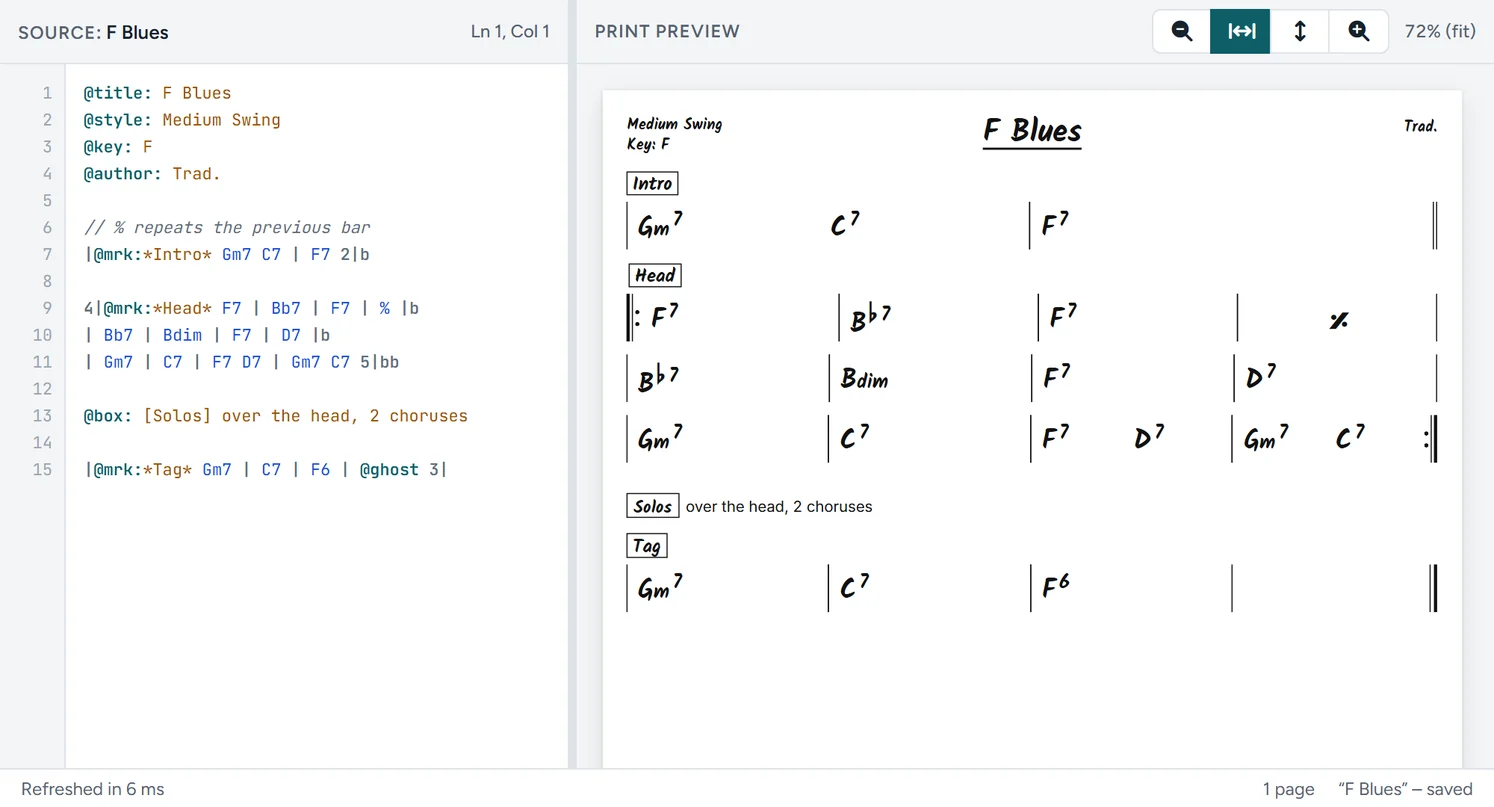
Everything a lead sheet needs
- Bar lines
- Slash chords
- Time signatures
- Sections
- Repeats
- Lyrics
- Tabs
From the first chord to the last song of the night
Write the chart in the editor, put it in a setlist next to your PDF's, and play the whole set from a tablet. On your own or with the whole band.
Chord chart editor
Type the structure of a song as text and get a print-ready lead sheet: sections, repeats, lyrics, tab and chord diagrams. Free, without an account.
Setlists and stage viewer
Part of Pro: your songs with a PDF for every part, setlists with breaks and a viewer that turns pages by swipe or pedal. Also offline.
Bands
One shared library for the band: everyone plays the latest setlist from their own part. Every band plan includes Pro.
Faster than dragging in notation software
A chart is structure: bars, sections, repeats. You type that faster than you can place it with a mouse, and the layout takes care of itself.
Type and see it instantly
Source on the left, print preview on the right. Every keystroke redraws the chart in milliseconds, so a misplaced bar shows up right away.
The layout you already know
Four bars to a line, hand-lettered chords, slash chords and a final double bar. Readable at a glance, even on a dark stage.
Boxed sections
Intro, Verse, Bridge, Tag: one marker boxes each section, so the whole band knows where you are when the leader calls it.
Repeats in a few characters
Repeat signs, 1st and 2nd endings, D.C. and D.S. al Coda take a few characters each. A % carries the previous bar.
Two columns on one page
Set columns in the source. A whole set list fits on one sheet, with no page turn in the middle of the bridge.
Print-ready
What you see in the preview is exactly what comes out of the printer or as a PDF. Ready for the book on the music stand or the bass player's tablet.
Learn it in an afternoon
A handful of symbols covers almost any chart. What you type reads back just as clearly: the source stays as tidy as the result.
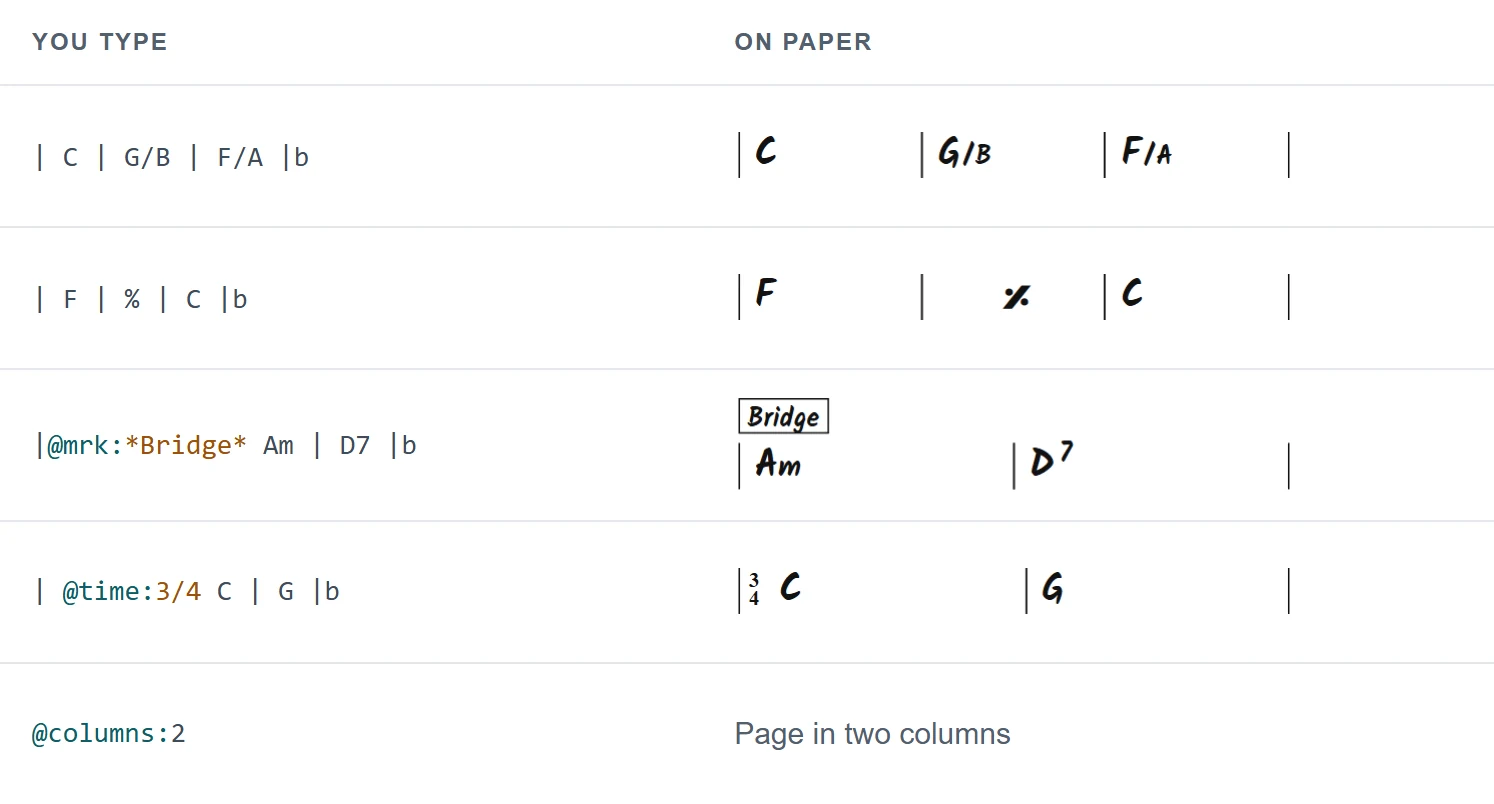
From listening to the music stand in three steps
-
Set up the header
Title, composer, style and key go at the top of the source. They appear in the chart header automatically.
-
Type the bars, section by section
Mark each section, use repeat signs for what comes back, and watch the preview follow along live.
-
Print or share
Check the print preview, then print the chart, save it as a PDF for the band or keep the .txt file.
Frequently asked questions
Before you write your first chart
Question not listed? See the FAQ or get in touch.
Do I need to learn a programming language?
No. The notation is bar lines, chord names and a few markers that start with @. The whole notation guide fits on one page.
Where are my charts stored?
Without an account your chart stays in your own browser as a draft, and you save it as a .txt file on your own device (Ctrl+S). With a Pro account you also keep your charts in My songs, ready on every device.
What are Setlists and Bands?
What does it cost?
The editor is free. Pro, with Setlists, costs € 29 per year; band plans with Pro included start at € 39 per year. See Pricing.
Can I print to PDF?
Yes. The print preview shows exactly what ends up on paper. Press Ctrl+P and choose PDF in your browser's print dialog.
Write your first chart before the next rehearsal
Open the editor, start from an example and make it your own.